Yanhua Mini ACDP BMW BDC2 Bench Test Platform with AKL License A501 Works with Module 38
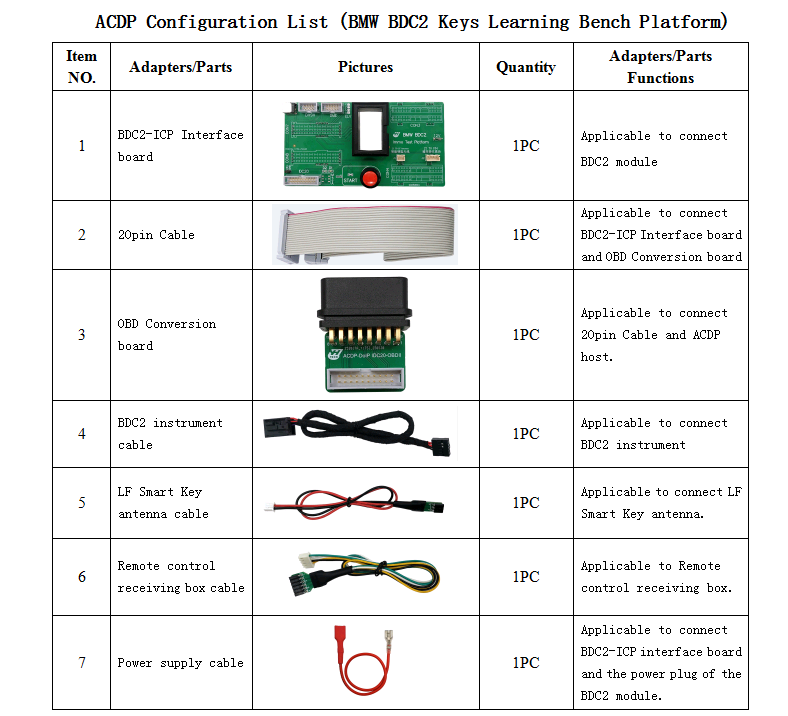
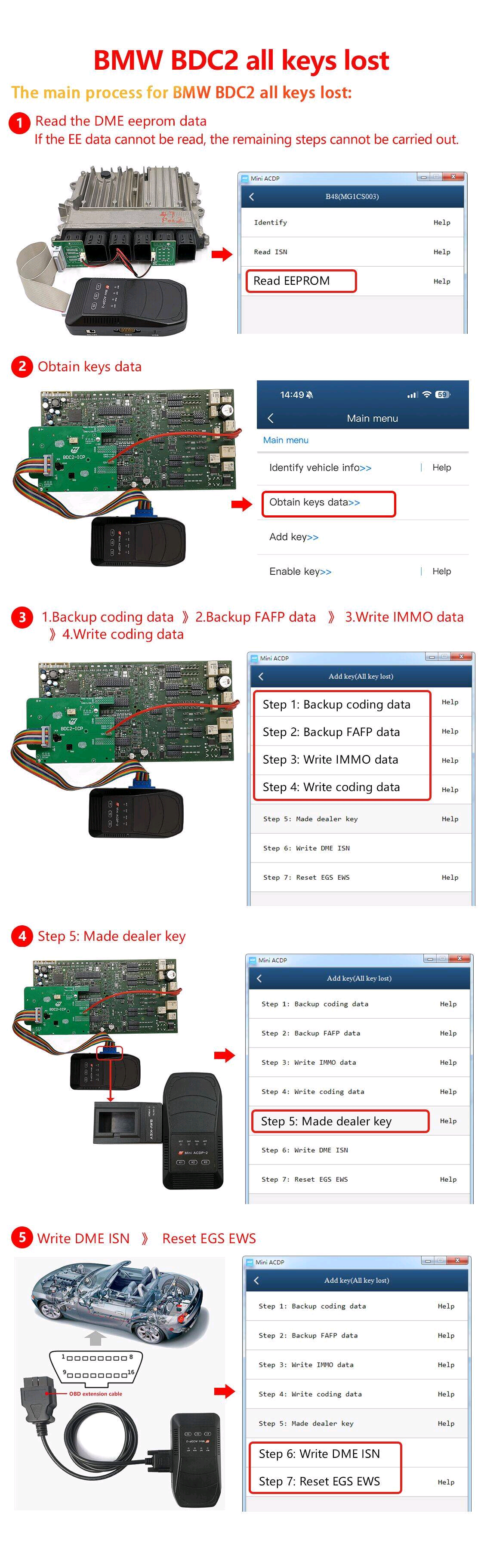
Yanhua BMW BDC2 Key Learning Bench Platform is a robust bench platform designed to support advanced BMW FEM/BDC2 system programming. Compatible with Yanhua ACDP Module, it enables secure, off‑vehicle key learning, diagnostics, and module testing for F‑ and G‑series BMW models, all without need the module installed in the vehicle.BMW BDC2 IMMO Test Platform Functions:1. Contains the BMW BDC2 all keys lost authorization A504(work with ACDP module 38)2. Can learn BDC2 keys on bench, no need to assemble BDC2 module back to car.3. Can test key emergency function to confirm whether the key can turn on ignition and ensure that the key has been learned.4. Supports to connect smart antennas and remote control receiver for testing key remote control and keyless.5. Supports to connect the BDC2 instrument and DME module.BMW BDC2 Bench Test Platform Features:1. Compatible with any device that supports the BDC2 module.2. The bench interface board replaces the wire plug-in, which is safe, convenient, simple and efficient.Yanhua ACDP BMW BDC2 All Key Full Package Includes:1. ACDP host(ACDP-1 or ACDP-2 Master)2. ACDP module 383. ACDP BMW ISN Module 3(read and write ISN, if you have other tool to read and write BMW DME ISN, no need ACDP Module 3)4. B48 Interface Board(necessary when backup EEPROM data)5. BMW BDC2 Key Learning Bench Platform with AKL License A504(need work with ACDP Module 38)Notice:1. Above items are must-to-have tools for BMW G-Chassis BDC2 all key lost programming. For ACDP old user, you just need buy the one which you do not have, for new user, need buy all of them.2. If you have other device which can read and write BMW DME ISN, you do not need the ACDP Module 3+B48 Interface Board)
How to Enter the All Key Lost Menu In ACDP APP?
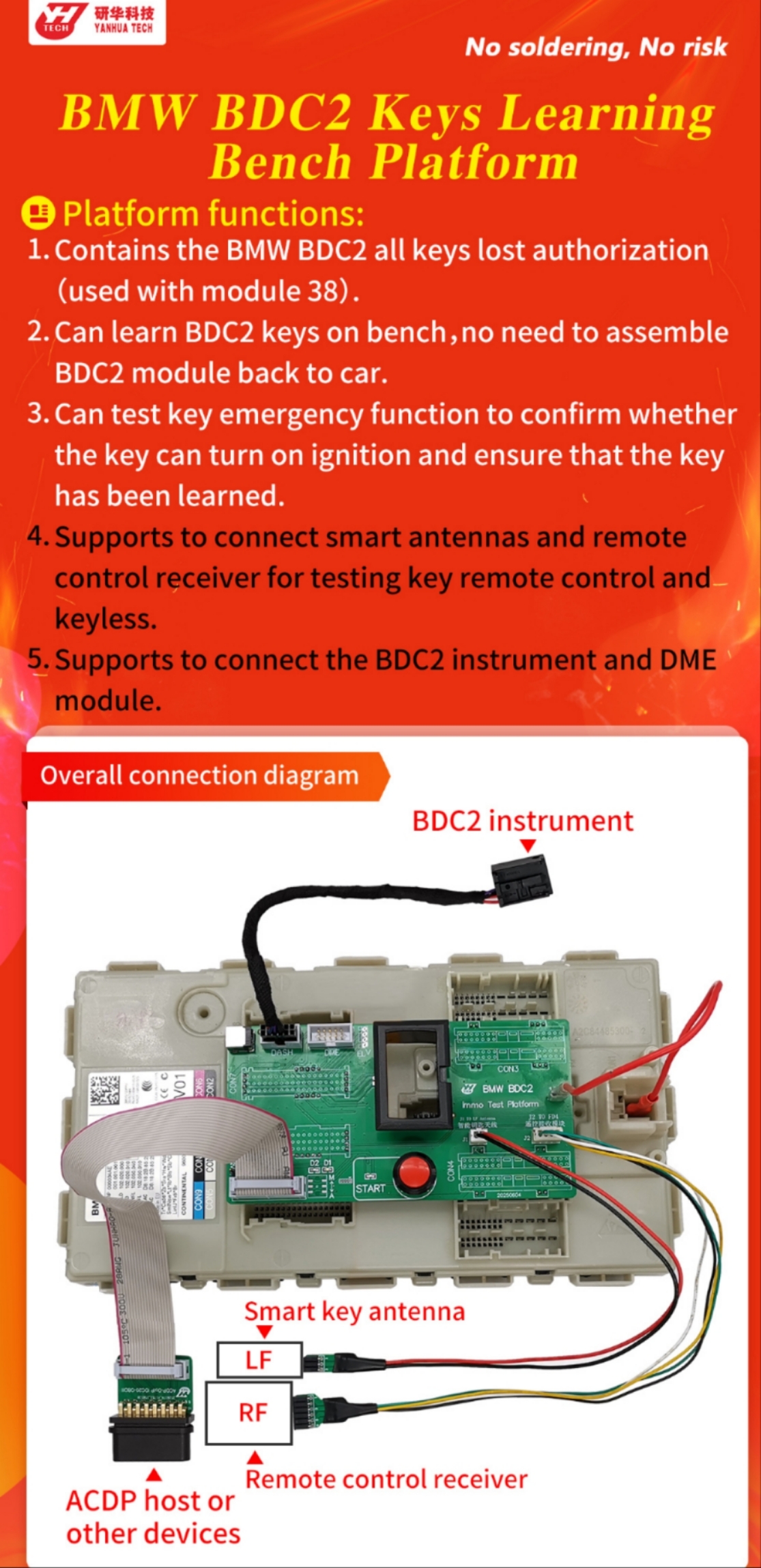
BMW-> FEM/BDC-> IMMO/Mileage-> BDC2 ICP+ OBD (F/G Chassis)-> Add Key (All key lost)
How to Do BMW BDC2 All Key Lost?
Step 1: Backup coding data
Use Yanhua ACDP Module 3 and B48 Interface Board to backup EEPROM data
Step 2: Backup FAFP data
Step 3: Write IMMO data
Step 4: Write coding data
Step 5: Made dealer key
After making the dealer key, turn on the ignition to do key match
Step 6: Write DME ISN
Verify the key can start the car normally, then go to next step
Step 7: Reset EGS EWS(turn on ignition, but not start the car)
After finishing these steps, start the engine - both the key and vehicle should now function properly.
Package List: