Yanhua ACDP BMW BDC2 AKL Package :
contains module 3, module 38, BMW BDC2 bench test platform and B48 interface board with free BMW BDC3 BCP interface boardNote:This package is for customers who have acdp-1 or acdp-2 master alreadyPackage incluced:1-ACDP Module 38 for BDC2 Add keys with license2-ACDP All key lost license with bench key learning plantform3-ACDP Module 3 with license for read BMW ISN 4-ACDP B48/B58 bench interface board for read BMW B48/B58 DME ISN
5-
BMW BDC3 BCP interface boardNotice:1. This package is for customers who have ACDP-1 or ACDP-2 Master Already2. BMW G Chassis BDC3, BMW U Chassic BCP Key Copying(need work with ACDP BMW BDC3 BCP Key Copy Interface Board Kit together)
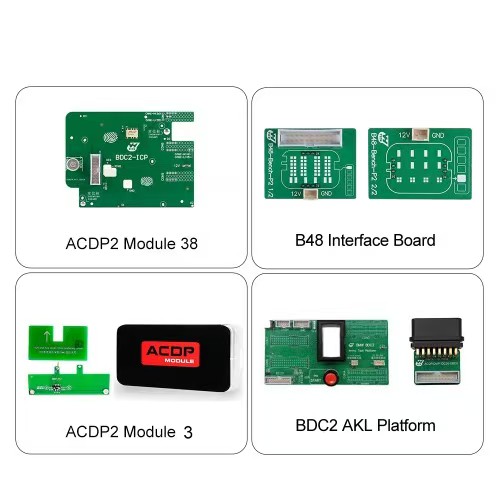
For BMW G Series BDC2 All key lost you will need
- 1. ACDP 1 or ACDP 2 host
- 2. Module 38
- 3. Module 3 ISN module + B48 interface board
- 4. BMW key learning platform with BDC2 AKL license (work together with module38)
Yanhua ACDP BMW BDC2 All Keys Lost Procedure:
How to Enter the All Key Lost Menu In ACDP APP?
- BMW- FEM/BDC- IMMO/Mileage- BDC2 ICP+ OBD (F/G Chassis)- Add Key (All key lost)
How to Do BMW BDC2 All Key Lost?
Step 1: Backup coding data
- Use Yanhua ACDP Module 3 and B48 Interface Board to backup EEPROM data
Step 2: Backup FAFP data
Step 3: Write IMMO data
Step 4: Write coding data
Step 5: Made dealer key
- After making the dealer key, turn on the ignition to do key match
Step 6: Write DME ISN
- Verify the key can start the car normally, then go to next step
Step 7: Reset EGS EWS(turn on ignition, but not start the car)
After finishing these steps, start the engine - both the key and vehicle should now function properly.
Step 1:Requires module 3 + B48 interface board to back up the original BMW engine EEPROM data.
If you have another tool to backup engine eeprom data, just buy module 38 + BDC2 test platform.
Risk warning:
1. This All-Key-Lost function is only an emergency solution and will affect the BMW Dealer service. Please consider and note this before use.
2. This All-Key-Lost function will change the original vehicle IMMO info. If you want to restore original vehicle IMMO info in future, you need to order a new key from BMW Dealer. Then restore the IMMO info with ACDP (check video column).
3. This All-Key-Lost function does not work on BDC2 electric and hybrid cars.


