First, let’s start by identifying a marking: three letters — NXP. Many locksmiths just call it NXP. This logo belongs to a semiconductor manufacturer, NXP Semiconductors. It originally spun off from Philips in the Netherlands, the European Netherlands.
You will frequently find this marking on automotive key chips, though some locksmiths may not have encountered it yet. If you haven’t seen it, let’s zoom in on these three letters. Do you recognize it now? If it still doesn’t ring a bell, I’ll show you some photos. Look at the key chip; I’ll zoom in and rotate it. Can you see the NXP marking clearly?
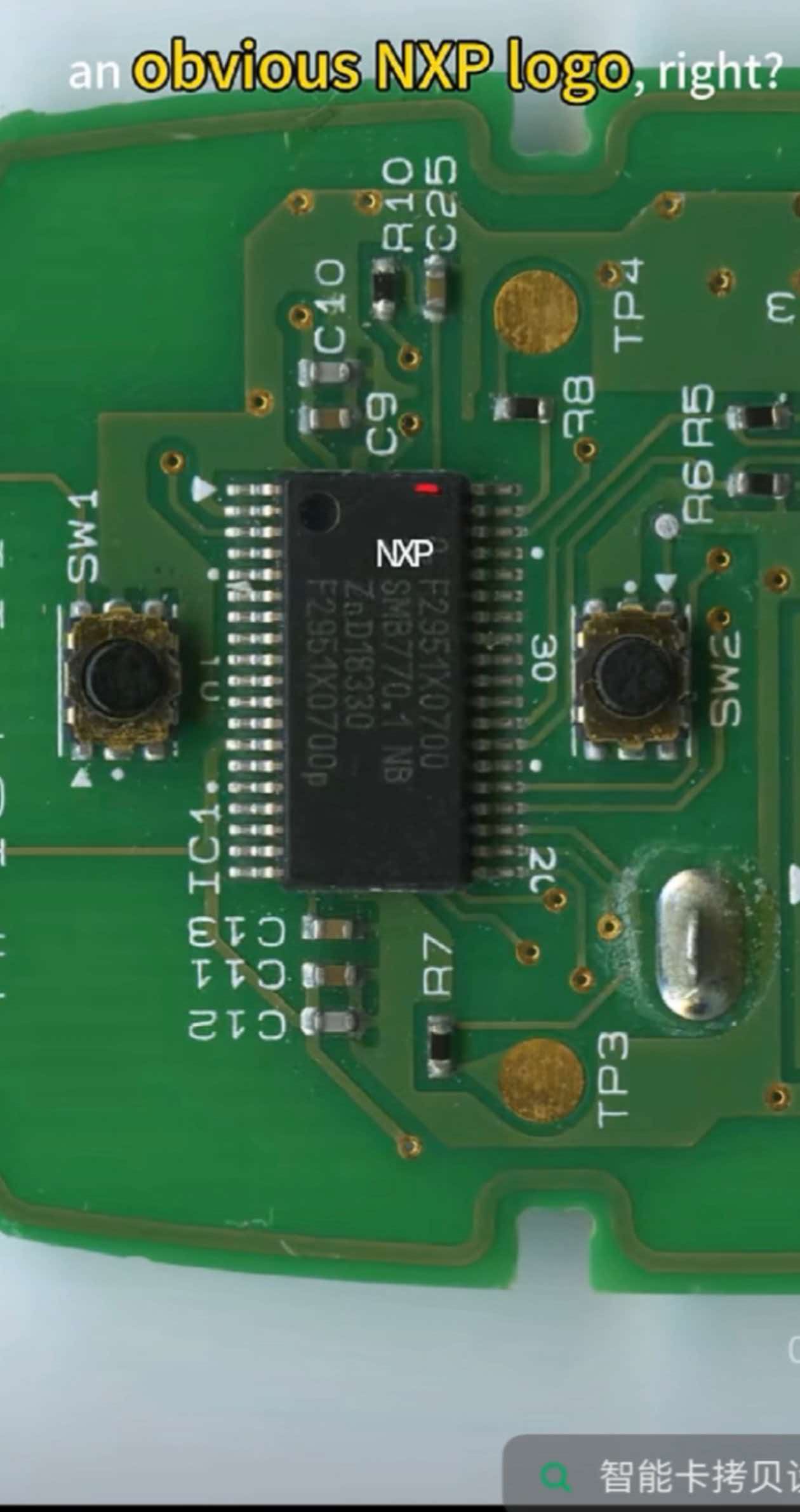
Here’s another common longer-style chip. Rotate it, and you can also see the distinct NXP logo. If this marking is present, the chip is made by NXP. Most aftermarket smart key cloning devices on the market work primarily with smart keys built around NXP main chips. This is the first basic rule for cloning smart keys: check whether the main chip is an NXP part.
This first check is simple. NXP chips almost always carry the NXP silkscreen. When you get a smart key, just use a magnifying glass and look for the NXP marking on the chip.
But does every smart key with an NXP‑marked chip work with our cloning device? Definitely not. You may have noticed that cloning device vendors advertise support for NXP NCF29 series chips.
One important point: NXP prints its own “NXP” logo on chips, but it does not print “NCF29” on them. If you check your own smart keys, you will likely find chips marked NXP, but almost none marked NCF29.
This creates a problem for locksmiths: without an NCF29 label, how do you tell which key chips are NCF29 and which are not? In other words, how do you know which smart keys can be cloned with our device, and which cannot?
I’m going to share a reliable method. Real chips are tiny and hard to show clearly on video, so I created 3D models of the common NXP chips used in car keys. We will use these 3D models for today’s demonstration.
These four chips on screen all have different shapes. The letters and numbers I wrote on them are only for identification — they are not printed on real chips.
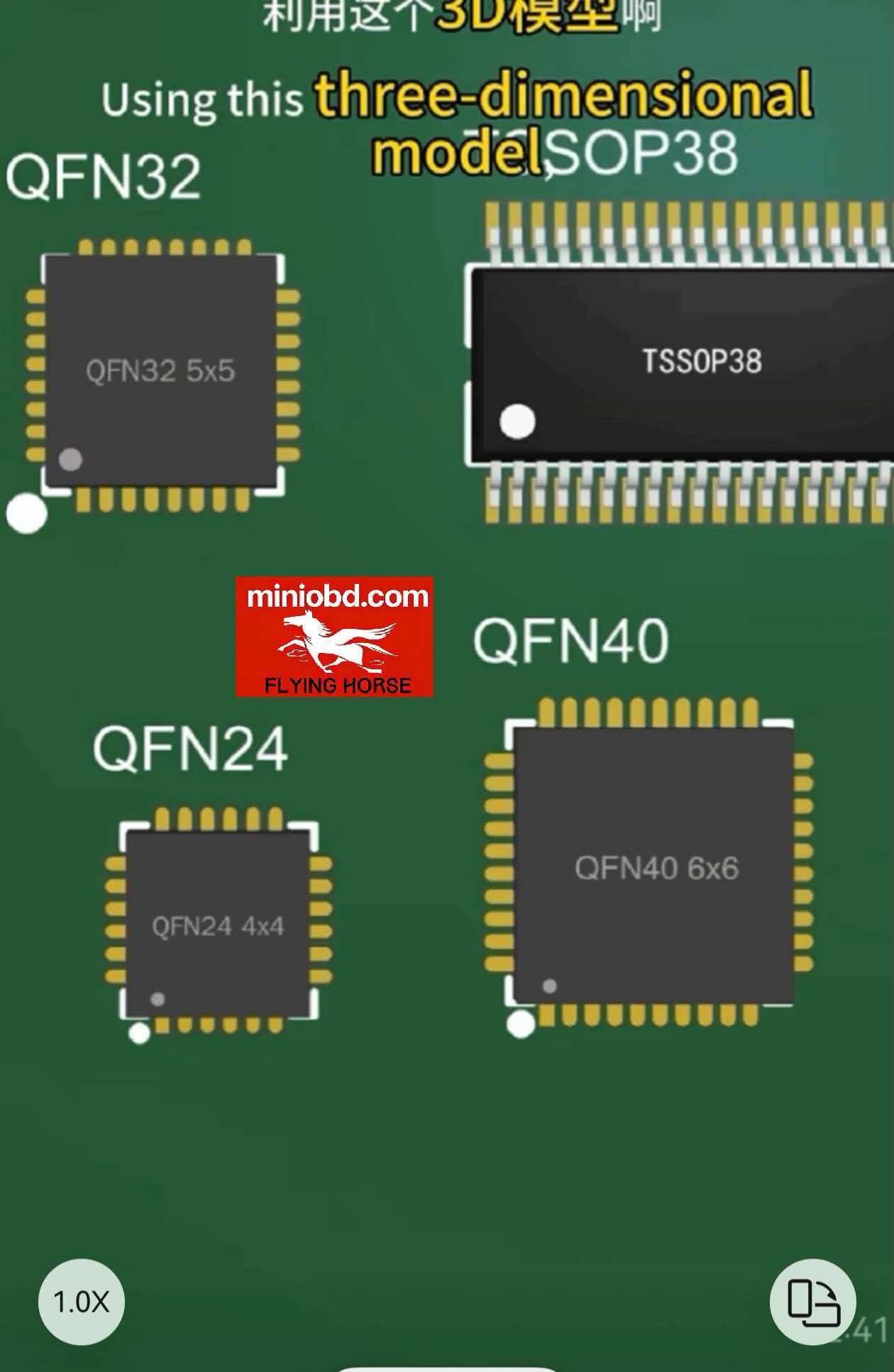
The first one is QF32, 5×5. QF32 refers to the chip package. Think of the package as the chip’s physical form, just like distinguishing a lion, a tiger or a giraffe by appearance. This square package has 8 pins on each side, for a total of 32 pins, so it is called QF32. “5×5” means the chip measures 5 mm by 5 mm.
The second one is marked TSSOP38. This is the name for its package: an elongated chip with pins on both sides, 38 pins in total. For comparison, the common 8‑pin 24C64 EEPROM uses an SOP package, with wider pin spacing than TSSOP.
The other two are QFN40 (40‑pin square package) and QFN24 (24‑pin package).
Once you recognize these four package types: if a smart key’s main chip has the NXP marking and uses one of these four packages, it can almost always be read and cloned with our cloning device.
Now let’s look at real examples of these chips on smart key circuit boards.
This is the very common QFN32 package, with the NXP marking clearly visible. Next is the QF32N package. Then the TSSOP48 package, also with a visible NXP chip. After that is the QFN40 chip. The last one, QFN24, is less common. It is mostly used in chip keys rather than smart keys.
To summarize the method for locksmiths:
Take apart the smart key, check if the chip has the NXP marking. If it does, check whether its package matches one of the four types we covered. If yes, it can most likely be read and cloned.
Note that this is a general rule, not 100% universal. There is one rare exception I have encountered: the Volkswagen MQB folding key 19C. It uses an NXP QFP32 chip, but most smart key cloning devices on the market cannot read or clone it. This is an isolated rare case. The method we covered works for the vast majority of keys.


